Table of Contents
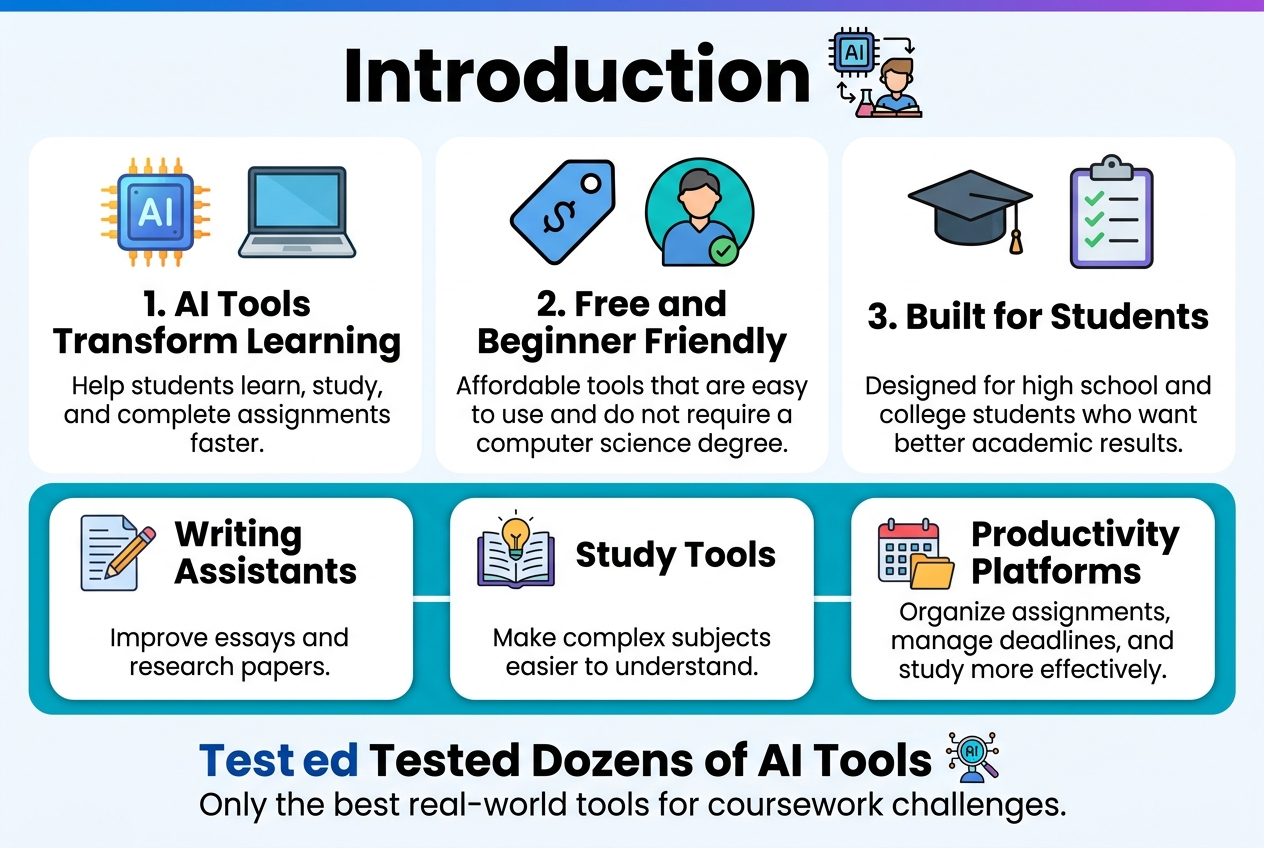
Students have been provided with some of the most advanced AI tools that can revolutionise their learning and assignment writing process. In this guide, we will discuss free AI tools for students in 2026, focusing only on tools that are free and easy to use for beginners.
The following is an extensive guide on using AI tools to improve academic results. We have tried dozens of student-oriented AI software to make sure we only recommend those that can really be used to resolve actual coursework problems.
You will find the best AI-powered writing assistants that students may use to write better essays and research papers, alongside AI learning apps that simplify difficult concepts for you. Additionally, we will discuss the most intelligent productivity platforms to assist you in managing your homework and studies more efficiently.
Why AI Tools Are Essential for Modern Students
Why Free AI Tools for Students 2026 Are Important
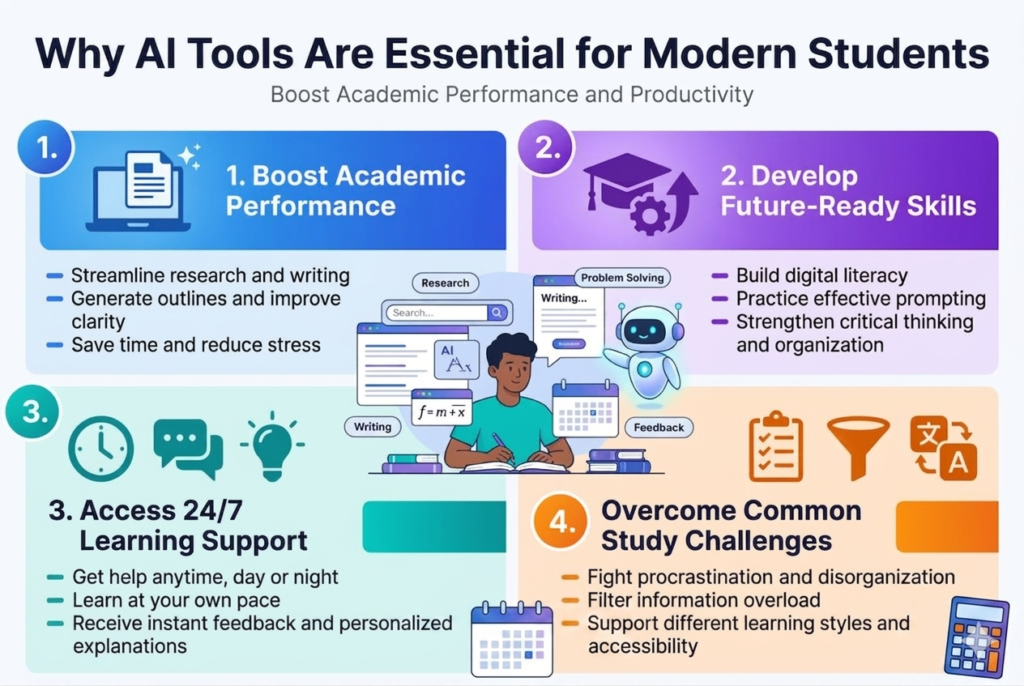
Today’s generation of students is facing an excessive amount of studies, assignments, and research work, all of which can become extremely challenging to cope with. However, with the recent introduction of new AI solutions for students, their approach to educational tasks has changed radically. These tools allow not only to simplify the process of research but also to save time by half.
With an essay in research format to write, AI writing assistants can assist you with the process from idea generation to structuring and even source suggestions. With such software, you won’t be spending several hours staring at a white sheet of paper when your assignment could be accomplished quickly while improving your writing and catching mistakes.
Free AI tools for students 2026 include advanced software that will be able to analyze the way you write and make recommendations for improvement based on your educational level and discipline. The software does not merely check grammar but also allows you to improve your arguments and keep your tone uniform..
Math and science students benefit enormously from AI-powered problem-solving assistants that can walk through complex equations step-by-step, explain concepts in multiple ways, and provide practice problems tailored to your learning pace. This personalized approach helps students grasp difficult concepts faster than traditional study methods.
Develop Future-Ready Skills
However, the workplace is also undergoing an evolution, where employers seek applicants skilled in working alongside artificial intelligence technology. Through the use of AI in education platforms for studies, learners automatically hone their digital literacy skills, which will be necessary in all kinds of careers.
The ability to learn how to prompt artificial intelligence systems and know how to apply such tools is becoming a critical skill set. Students who gain these competencies through their education experience a definite advantage once they enter the job market.
Free AI tools for students 2026 also equip learners with useful management and organisational skills. The skills you gain when using AI technology to manage your time and plan projects will definitely serve you in the future career environment.
The majority of AI tools make users question and analyze the reliability and authenticity of information, which is an essential aspect of today’s world. The critical ability of analyzing information does not get undermined while working in collaboration with AI technologies.
Access 24/7 Learning Support
However, the traditional methods of studying have some serious limitations, such as library closure, unavailability of tutors, and even a lack of availability of study groups during odd hours. This is where the free online AI assistance tools that can be used by the students prove extremely useful.
This accessibility feature is especially beneficial to non-traditional learners, people residing in other time zones, or individuals with hectic schedules. If a concept is hard to understand at midnight, or there is a need to enhance language skills while on transit, the AI is available to offer assistance.
The AI learning platform will instantly correct your work when you attempt solving practice questions and even use different methods to explain certain concepts until you comprehend them. The personalised learning that is offered by AI learning platforms was previously only affordable through costly private tutors.
In addition to this, the availability of free AI tools for students 2026 throughout the day gives learners the chance to study at their own pace and not feel any pressure or embarrassment when asking any queries. Therefore, learners will have a secure environment to explore challenging areas without fear of failure.
Overcome Common Study Challenges
Procrastination, demotivation, and problems with organising learning materials are common obstacles that most students face. AI study tools solve this problem through smart prompts, gamification techniques, and automation of organisational systems.
Many students face a problem called information overload, where there is simply too much information available to use efficiently. AI systems have the ability to filter through all the available sources and find the most important and relevant information in a concise way.
The development of user-friendly artificial intelligence software makes life easier for students who are apprehensive about using any kind of new technology because the interfaces of such programs are easy to use.
These factors are no longer considered hindrances in education. With AI-based software, content can be translated into a language that the learner understands. The AI can also present information as audio or visual content. Moreover, content can be tailored according to the learner’s style and pace of learning.
Best Free AI Tools for Students 2026 for Writing and Research
ChatGPT for Essay Planning and Brainstorming
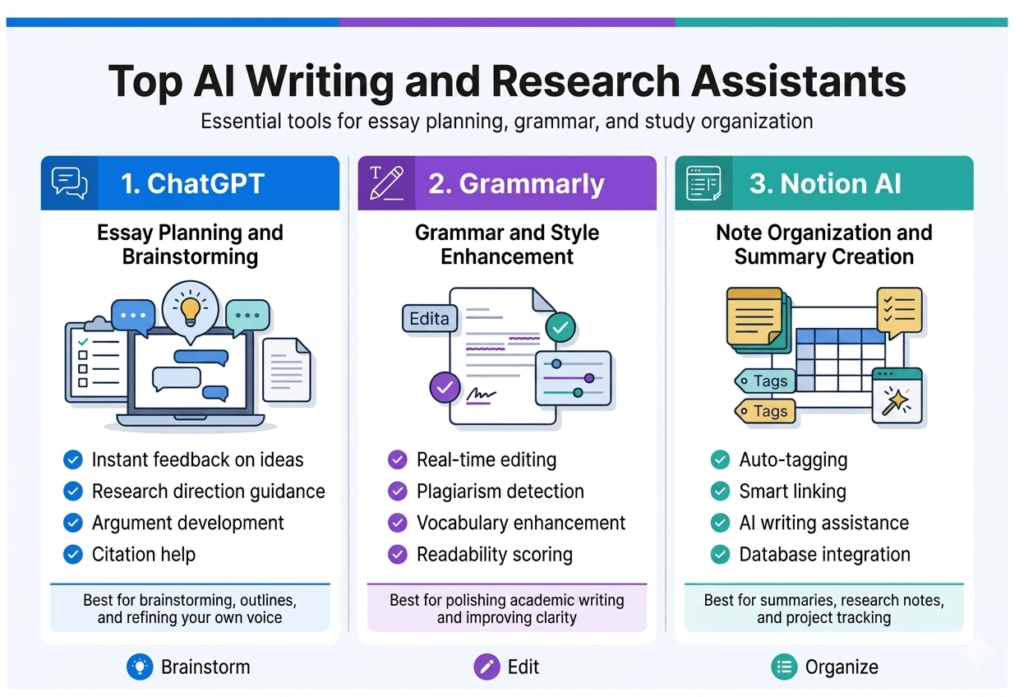
In the year 2026, ChatGPT is considered one of the most versatile AI writing assistants that students can use for free. This amazing writing assistant is very efficient in assisting students in overcoming writer’s block as well as formulating an extensive structure for their essays.
When looking at a blank sheet of paper and pondering how best to tackle the task, ChatGPT becomes your brainstorming assistant. All you need is to explain your topic of interest and assignment specifics. ChatGPT will provide several angles from which to approach the assignment, suggesting various perspectives that would never come to your mind on your own. For instance, while working on climate change, ChatGPT could advise exploring its economic, technological, political, or even social dimensions.
The best part about this tool is that it helps create essay outlines. Once you have discussed the topic with the AI, ask it to help you outline your ideas. It will give you a great opening hook for your introduction, a strong thesis statement, ideas for your body paragraphs, and some suggestions on how to conclude your essay.
Key features that make ChatGPT invaluable for students:
- Instant feedback on ideas: Test different thesis statements and get immediate suggestions for improvement
- Research direction guidance: Discover relevant subtopics and questions worth exploring
- Argument development: Transform basic ideas into sophisticated, well-reasoned positions
- Citation help: Get assistance formatting references in APA, MLA, or Chicago style
Students must note that while ChatGPT can be helpful in assisting one to come up with new ideas and overcome writer’s block, the software is most effective when used as a means of collaboration instead of a substitution for original thinking.
Grammarly for Grammar and Style Enhancement
Grammarly has turned out to be a very essential AI study tool, which is much more than just spell-checking. The updated version of Grammarly in 2026 provides advanced analysis of written content, which aids students in perfecting their work to professional standards.
The free version of Grammarly ensures that the user gets all-encompassing grammar checks, from comma splices to subject-verb agreement errors. However, what makes Grammarly great is the fact that it offers contextual tips. Rather than just identifying mistakes, it provides explanations and various correction options to help you understand the rules of grammar.
Among the extra features, which can be accessed via most institutional licenses to Grammarly, is the possibility to get sophisticated style suggestions. In other words, the service analyses the author’s writing style, giving some tips on making it more academic or clearer.
Writing enhancement features students love:
- Real-time editing: Get suggestions as you type in Google Docs, Microsoft Word, or web browsers
- Plagiarism detection: Ensure your work is original with database cross-referencing
- Vocabulary enhancement: Discover more precise word choices and synonyms
- Readability scoring: Adjust complexity levels for your intended audience
The plug-in is consistent on all platforms, ensuring that you receive corrections to your writing in emails, social network posts, and online assignments. Such consistency will ensure that you develop good writing practices in your interactions in the digital environment.
Grammarly provides the ideal learning companion for non-English speaking students. Through the explanations provided, a student acquires language skills even while working on the assignments.
Notion AI for Note Organization and Summary Creation
Notion AI turns disordered study resources into structured information management systems. Notion is an AI-powered learning system that seamlessly blends conventional note-taking with smart information handling, making it ideal for learners juggling more than one course at once.
Summary generation through AI is changing the way in which students read long texts. Upload research papers, chapters from textbooks, or lecture notes, and Notion AI will generate the most important parts of the texts for you. The summary generation function comes in handy when preparing for exams.
The Notion template system, with the addition of AI suggestions, facilitates note-taking and structuring in a uniform way within different subjects. This is because the AI will create tailored templates depending on your method of studying, be it using Cornell notes, mind maps, or outline structures.
Advanced organization features for students:
| Feature | Benefit | Best Use Case |
|---|---|---|
| Auto-tagging | Categorizes content automatically | Research project management |
| Smart linking | Connects related topics across notes | Building concept maps |
| AI writing assistance | Helps expand on brief notes | Essay development |
| Database integration | Tracks assignments and deadlines | Course management |
The collaborative element ensures that everything goes smoothly in group projects. Collaborate by sharing databases among each other, allocate duties automatically, and monitor your project status with automatic updates from an AI. It is also capable of allocating tasks to team members based on their strengths.
Many free versions of AI programs usually do not contain sophisticated organisational features, whereas Notion’s free version offers quite good AI features. The students will be given many chances to use Notion’s capabilities of summarisation, content creation, and organisation.
The mobile application ensures that your notes always stay with you, organised. With voice-to-text capability, you can record your ideas immediately from lectures, with AI organising and classifying the data automatically once back at your PC.
Best Free AI Tools for Students 2026 for Math and Science
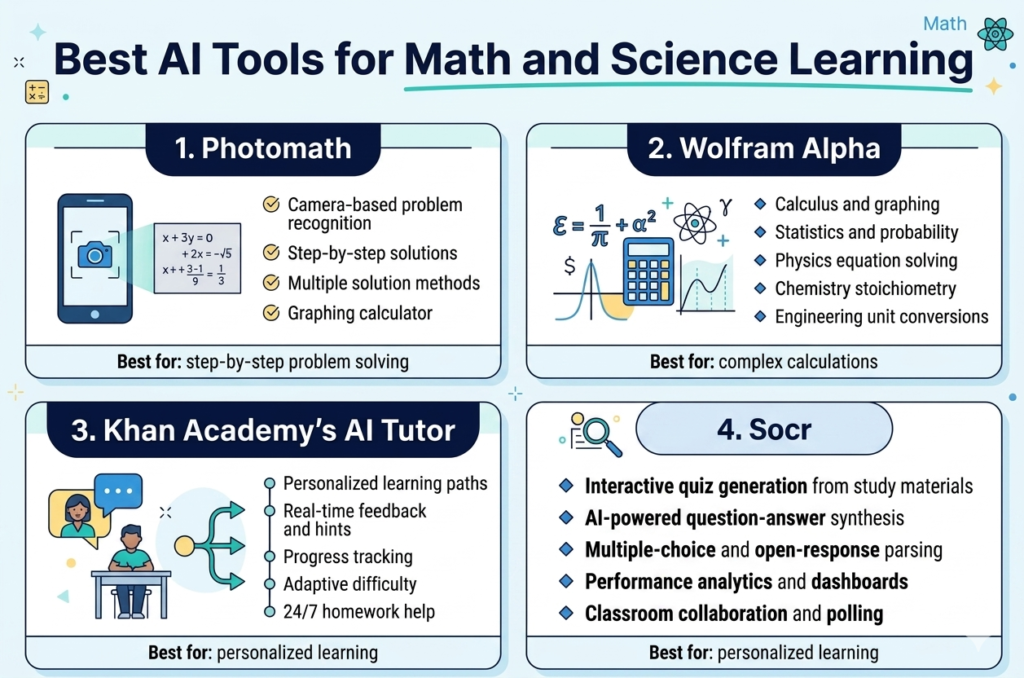
Photomath for Step-by-Step Problem Solving
Math becomes easier with Photomath, as this AI app helps students solve any kind of mathematical problem through their smartphones. All you need to do is capture a photo of any problem on your phone’s camera, and you will be shown step-by-step solutions to the problem.
The key aspect that distinguishes Photomath from other similar software is that it has the capacity to solve complicated tasks by dividing them into more manageable parts. Students receive not only an end result but all the steps involved in the process of calculations, with explanations provided.
This app features a wide variety of mathematics subjects, including simple math and algebra, all the way up to calculus and statistics. You will be able to solve word problems, learn to graph, and even learn how to do geometry proofs. The ability to read handwriting has come on by leaps and bounds.
Key Features:
- Camera-based problem recognition
- Detailed step-by-step solutions
- Multiple solution methods for single problems
- Graphing calculator functionality
- Free version covers most high school math topics
Wolfram Alpha for Complex Calculations
One of the most useful AI-based computational tools for students is Wolfram Alpha. This particular “computational knowledge engine” is very useful because, unlike search engines, it understands questions related to math and gives exact answers and explanations along with visual representations.
Students have the ability to enter complex equations, statistics questions, or even scientific formulas in normal English, and Wolfram Alpha will decipher the equation to give detailed answers. This program is particularly strong in solving calculus problems with multiple variables, differential equations, matrix math, and statistics.
Apart from being a useful tool for mathematics, Wolfram Alpha also helps greatly in physics, chemistry, and engineering. It can be used to do calculations involving thermodynamics, chemistry equations, unit conversion, plotting, and graphing of various equations.
Popular Use Cases:
- Calculus problem solving and graphing
- Statistical analysis and probability calculations
- Physics equation solving
- Chemistry stoichiometry problems
- Engineering unit conversions
Khan Academy’s AI Tutor for Personalized Learning
The Khan Academy’s artificial intelligence (AI)-powered tutor, Khanmigo, is an example of revolutionary technology in the teaching of mathematics and sciences. Khanmigo is a tutor that personalizes its services depending on the speed and preferences of the student taking the lesson.
The AI tutor doesn’t simply give students the answer, but instead helps them develop their thought process via the Socratic method. If the student is having trouble comprehending a particular idea, Khanmigo asks guiding questions, which lead to the student understanding the problem on their own.
Students’ progress is measured in each of the subjects and areas where knowledge deficits are found, along with suggestions for extra classes. Students get feedback instantly on their performance with an AI tutor giving reasons for errors and alternative problem-solving strategies.
Benefits of AI-Powered Learning:
- Personalized learning paths
- Real-time feedback and hints
- Progress tracking and analytics
- Adaptive difficulty adjustment
- Available 24/7 for homework help
Socratic by Google for Homework Help
Homework struggles can be turned into learning experiences via the powerful question analysis done by Socratic AI. By taking a picture of their homework questions in various subjects, students will be able to access relevant information, video lessons, and explanations from credible education websites.
The power of Socratic rests in its capacity to understand the context and provide the user with the best possible information available. Instead of providing simple answers, Socratic compiles explanations and insights from credible websites such as Khan Academy and Crash Course.
Socratic can be particularly helpful for math and science, since it does a great job of explaining how difficult problems can be simplified to basic concepts. Students dealing with stoichiometry in chemistry, kinematics in physics, or even more complicated algebra topics get help that is tailored to solve their particular misunderstandings.
The voice search function lets students ask their questions without typing, which is especially handy when studying. Socratic can interpret any form of the question posed by a student.
Standout Features:
- Multi-subject homework support
- Voice and photo-based queries
- Curated educational content
- Concept explanation links
- Free access to premium educational resources
AI-Powered Language Learning Platforms
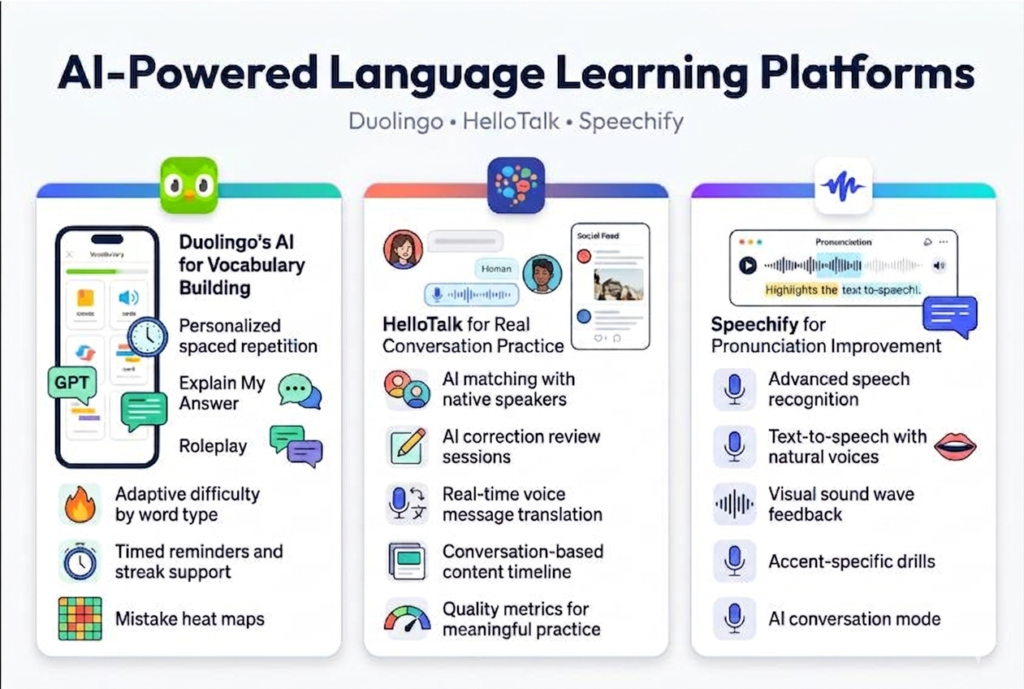
Duolingo’s AI Features for Vocabulary Building
However, Duolingo is way more advanced than mere flashcards because they use state-of-the-art AI learning platforms that take into account your unique learning process. The app utilises AI technology that assesses how fast you learn particular words, what mistakes you usually make, and even predicts what words you will probably forget. Consequently, it uses these factors for the personalised spaced repetition algorithm, so you will see the words right before you forget them.
Among the latest additions to the platform is AI technology named Duolingo Max that involves two major features based on GPT-4. First, the “Explain My Answer” feature allows you to converse with an AI regarding why some answers were right or wrong. Second, there is the “Roleplay” option, where you learn words in practice mode.
What makes Duolingo especially effective is an adaptive difficulty level based on your progress in various word categories, such as nouns, verbs, adjectives, etc. If you have trouble with verbs in the past tense, for example, you will receive more practice exercises in that topic area. The AI will also take into account the time of day at which you learn and your usual training session time to provide you with suitable vocabulary.
The streak system is rather basic but still works thanks to behavioural psychology techniques suggested by AI research. Duolingo finds the most likely times when you may forget to log in and prompts you in real time to stay motivated. Premium members receive access to mistake heat maps, showing which vocabulary topics require your special attention.
HelloTalk for Real Conversation Practice
HelloTalk is unique when compared to other AI-based software for students because of its combination of artificial intelligence and real human interactions. The AI matching process in the application matches you with native speakers according to your study requirements, time zone, personal interests, and existing language skills.
The AI correction tool embedded in the application ensures that you learn during each chat session. Your corrections during the chats will be stored, and then, the application will provide you with custom-made sessions where you get an opportunity to work on the corrected errors using AI exercises.
Another example of what this app does is the voice message translator, which is another amazing feature. Here, the user can translate their voice messages at the exact moment they hear them to be able to make out complex conversations despite having difficulties with hearing comprehension. One can also listen to the conversation, read the translations, and reply properly.
AI timeline is one of the great features that helps users to learn languages by recommending content to them depending on what they are discussing and interested in. If one is discussing cooking, the user will see content such as recipes posted by native speakers.
The AI on HelloTalk also analyses the quality of the conversations. The AI will be able to detect if the conversation is contributing to your education or not. When the AI detects that you are involved in a meaningful conversation, it offers new ways to start one.
Speechify for Pronunciation Improvement
Using artificial intelligence in speech recognition, Speechify offers detailed feedback on the pronunciation skills comparable to costly personal tutoring in language classes. Thanks to the ability of Speechify’s artificial intelligence to recognise even minor pronunciation mistakes, users receive specific tips on how to move their tongues, where to stress syllables, and how to achieve the right rhythm when speaking.
Through the use of an AI in text-to-speech technology, Speechify provides voice-over with correct pronunciation that is spoken in natural voices and can be heard at various speeds. Users can slow down difficult pronunciations and repeat them as often as needed while comparing their pronunciation with that of the model.
The speechify AI assistant can be used to train one’s pronunciation since one can read the texts alongside listening to correct pronunciations. The highlighter is synchronised with the audio, which helps train the brain in associating writing with pronunciation, and it is done much faster.
The AI will detect any accent and give relevant exercises on how to improve. For example, a person learning English through Spanish may need to work more on pronouncing the letter “th” while a person from France may need help in pronouncing “h.”
Recent developments include AI chat mode, which allows you to work on improving pronunciation skills by having a chat with the AI. You speak, and the AI analyses your speech and gives feedback.A
Smart Study and Productivity AI Tools
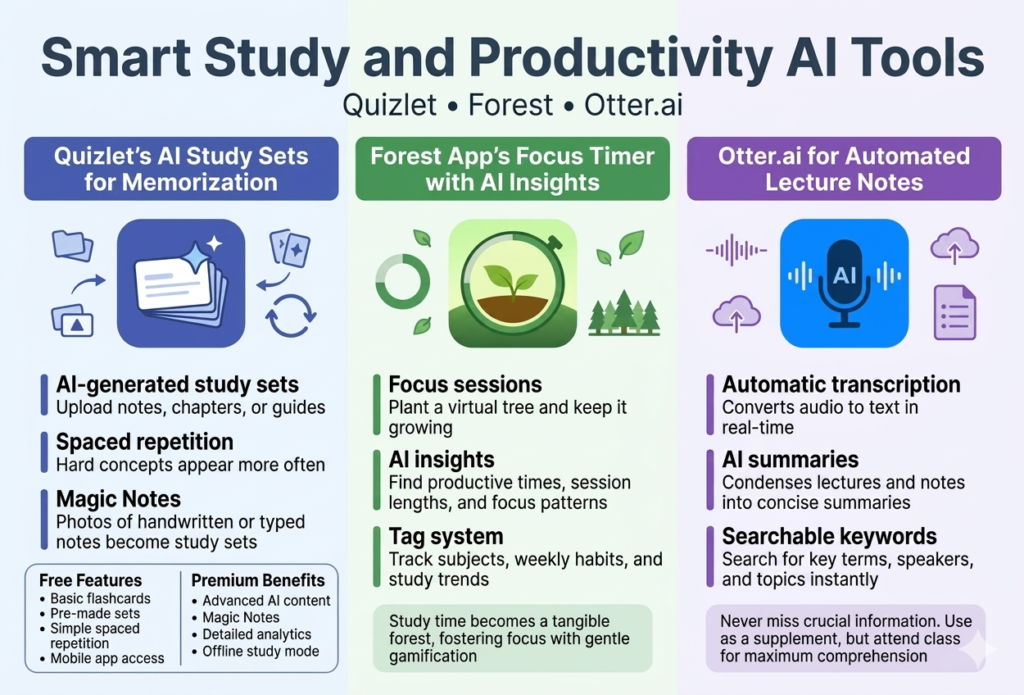
Quizlet’s AI Study Sets for Memorization
Quizlet has proven to be a revolutionary tool for all those students who want to memorize large chunks of information in the least amount of time possible. Thanks to its AI-powered capabilities, traditional flashcards are no longer the same since they have now turned into an adaptive experience tailored specifically to your requirements.
AI-made study sets are made by creating questions based on any material you upload to the website. Just upload whatever it is, and the AI tools provided by Quizlet for students will automatically make different questions like fill-in-the-blanks, multiple choice questions, and true-or-false questions.
Spaced repetition on Quizlet identifies the challenging concepts and displays them to you often enough until you fully master them. The AI studies your learning patterns and adjusts the time interval between displaying cards to make sure that you memorize information efficiently. Cards that are easy to answer will display less often than those that you find difficult.
Magic Notes is definitely one of the most useful features of Quizlet’s productivity AI for students who cannot find time for studying. Upload pictures of hand-written notes or documents and let the artificial intelligence take care of the rest by creating study materials automatically. Magic Notes can be especially helpful when dealing with subjects such as biology, history, or foreign languages.
Free Features:
- Basic flashcard creation and study modes
- Pre-made study sets from other users
- Simple spaced repetition
- Mobile app access
Premium Benefits:
- Advanced AI-generated content
- Magic Notes feature
- Detailed progress analytics
- Offline study mode
Forest App’s Focus Timer with AI Insights
By adding an element of fun to focus sessions and offering important information based on AI analysis, Forest makes studying an enjoyable activity for you. With the help of the virtual tree planting technique, this application allows students to create study routines that stick.
Once you start a focus session, you begin a process of growing a virtual tree. Exiting the application when the timer is still running causes the death of the tree. Gradually, you will have grown a virtual forest, which will show you how many hours of studying you’ve accumulated.
The AI insights tool detects your focus patterns to help determine your most productive hours of the day, ideal length of sessions for studying, and what topics need your full attention. The use of AI in studying will enable you to allocate your toughest tasks during your energetic hours while allocating easier ones during other hours.
The tagging system in Forest enables you to track different subjects and activities. The AI then uses the collected data to detect which subjects take the longest time, which makes you unable to concentrate, and variations in your productivity depending on the days of the week.
Key AI Features:
- Productivity pattern recognition
- Optimal study time recommendations
- Subject-specific focus analysis
- Weekly and monthly progress reports
The software connects with other productivity apps as well and delivers real-world results through collaborations with tree planting organisations. The students can turn their online success into something practical as they help save the planet, thus giving more purpose to their studies.
Otter.ai for Lecture Transcription and Note-Taking
Otter.ai innovates the way students record and organize the information from their lectures using live transcription and smart organizational capabilities. Otter.ai, which is an artificial intelligence learning platform, ensures that students do not have to worry about taking all the information while listening attentively to complicated explanations.
The artificial intelligence system is efficient at transcribing audio files in high quality, even those with technical terms used in the educational environment. Students can devote themselves fully to grasping concepts without having to take notes. Otter.ai automatically distinguishes between various speakers.
The live highlight function will allow you to underline critical points even as they are being said, thereby giving immediate visual importance to certain points in your transcript. With the search feature, you can easily find specific information or keywords on all your lecture recordings, making exam revision easier.
Otter’s smart summary tool gives summaries for each lecture. This is useful in reviewing your notes because they cover the critical points mentioned in each class session. The program even automatically generates timestamps, allowing you to go straight to any part of a recording while studying.
Academic Benefits:
- Complete lecture capture without missing content
- Searchable transcripts across all subjects
- Automatic speaker identification
- AI-generated summaries and keywords
- Integration with note-taking apps
Collaboration Features:
- Shared transcripts for study groups
- Comment and highlight sharing
- Real-time collaborative note-taking
- Export options for various formats
The free version is quite comprehensive for individual learners, and premium functions allow enhanced teamwork capabilities and extra recording duration for long lecture sessions or seminars. The program Otter.ai caters to learners who face problems with hearing issues, non-native speaking backgrounds, or people who like to read instead of listening.
How to Choose the Right AI Tool for Your Needs
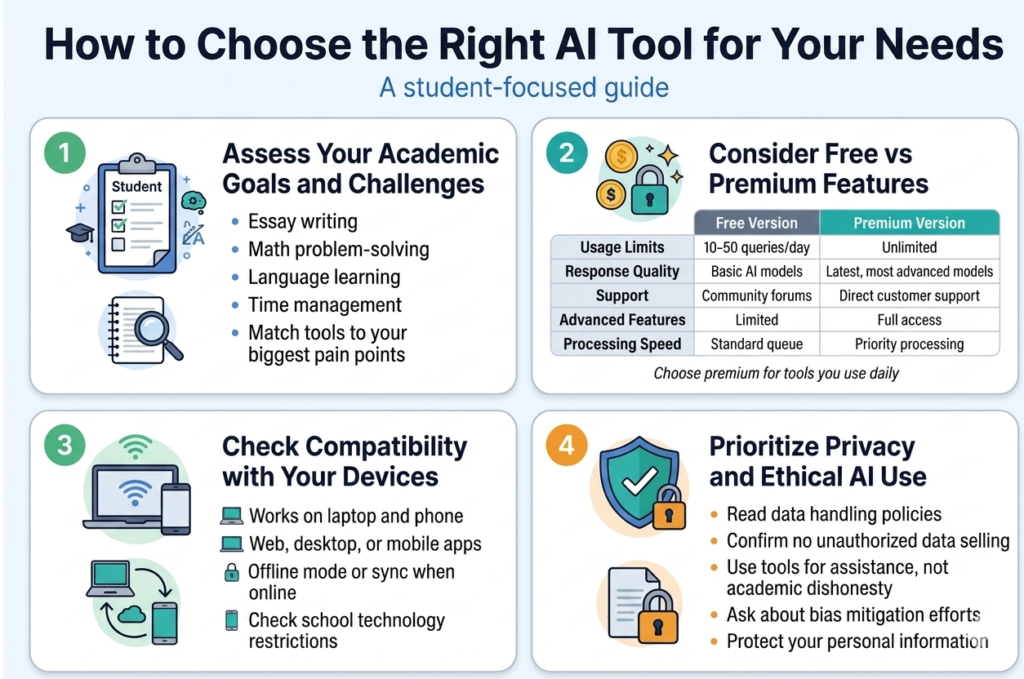
Assess Your Academic Goals and Challenges
However, before jumping into the vast ocean of Free AI tools for students 2026, pause for a minute to think about your exact purpose. Is your problem with essay writing, solving mathematics problems, studying a foreign language, or managing your time efficiently? As there are multiple AI tools for students, understanding the exact area you want to work on will save you much time.
First of all, create a list of your main academic struggles. You could be an excellent researcher, but fail miserably when it comes to essay writing. Or, perhaps, you are good at history but cannot cope with calculus. Moreover, you might be learning Spanish, but have trouble memorizing vocabulary.
Do not overlook your own learning styles. Some people find it easier to understand things when they see them visually, while other students might be audio learners or need something practical. Since many artificial intelligence learning systems provide varied ways of explaining the same idea, knowing what works best for you is important.
Think of your plans, as well. For example, if you plan to go further after you finish your college degree, then learning research-based AI programs might benefit you in the long term. If you intend to pursue a career related to the field of science and technology, then math and science AI assistants might be a great choice for you.
Consider Free vs Premium Features
As a student, money becomes important, and the best part about it is that most of the free tools available for students through various sources give some useful functionalities. In this regard, knowing the differences between what free and paid tools can do will guide you in making wiser choices.
Free AI tools that are suitable for beginners have great capabilities. They help with basic tasks, such as writing, solving math problems, and conducting basic research. Such free tools usually have limitations regarding the number of times one can use them in a certain timeframe, such as 10 queries per day or 1,000 words per month.
The features offered by paid AI tools include, among others, an unlimited number of usage times, enhanced functionalities, faster processing, and access to new technologies or AI models. For example, free AI writing tools assist users in getting creative ideas and correcting grammatical errors, while those at a premium level assist in creating full outlines and detecting plagiarism.
| Feature Type | Free Version | Premium Version |
|---|---|---|
| Usage Limits | 10-50 queries/day | Unlimited |
| Response Quality | Basic AI models | Latest, most advanced models |
| Support | Community forums | Direct customer support |
| Advanced Features | Limited | Full access |
| Processing Speed | Standard queue | Priority processing |
Consider subscribing to premium versions of tools you use daily. If you’re using an AI writing assistant for every assignment, the premium subscription often pays for itself in time saved and improved grades.
Check AI Tool Compatibility with Your Devices
The worst feeling is when you find out your ideal AI solution won’t work on your computer or smartphone. When considering an AI tool for student productivity, make sure to check how well it will run on all your gadgets.
First of all, see if the AI tool in question has a native application available for your particular operating system. Online AI tools usually support cross-platform operation, yet are unlikely to have as much functionality as their desktop versions. In case mobile applications are needed, they will come in handy for studying during breaks from school or work.
Don’t forget about the need for the internet as well. Certain AI resources work offline once they have been set up, but others need continuous internet access. If you are someone who often finds themselves in places without good WiFi access, choose those AI helpers that can work offline.
Think about what your school’s technology policy is as well. Certain universities may prevent students from accessing specific websites and even install software on university computers. It’s better to be prepared with some alternatives.
Evaluate the Learning Curve and User Interface
Any AI tool you might choose in 2026 will be practically useless if it is not simple enough for effective work. Two things you should pay attention to in order to ensure ease of use include UI design and the learning curve.
Free AI tools for students 2026 will have an interface that does not make it necessary to spend much time figuring out how it works. It will have an intuitive interface and prompts for various actions that make it easy for a student to work with such a tool.
Pay attention to how responsive the tool is when you communicate with it. If it requires some training to figure out how to use it properly, that means it takes too long for you to use it, thus making it less effective.
Finally, a good AI tool can explain its recommendations, which makes it possible for you to learn from it rather than getting ready-made solutions.
Best Practices for Using AI Tools Effectively
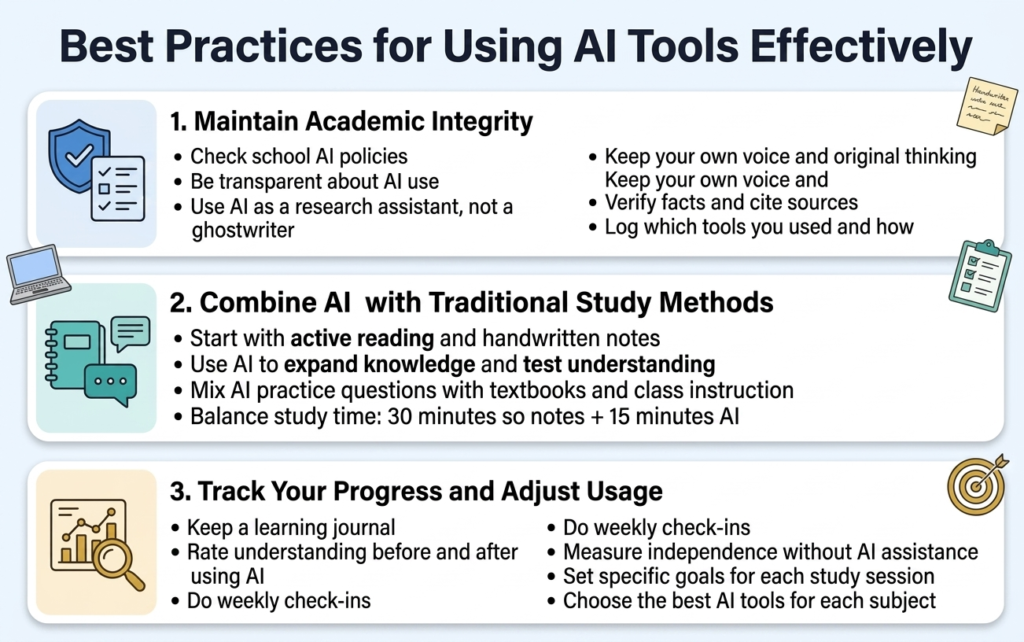
Maintain Academic Integrity Guidelines
It is imperative to know what is ethical to do when using AI software to enhance your studies. There are certain institutional guidelines concerning how the technology can be used within the educational system, and it is advisable to familiarize yourself with the rules prior to exploring AI in your education process.
The key principle of ethical AI use is transparency. When using any of the AI tools to conduct research or write an academic paper, one must disclose the use of the technology. AI can be considered as an assistant that helps with research; therefore, it is possible to use AI writing assistants for organizing thoughts or grammatical checking.
Define appropriate limits when it comes to different kinds of tasks. For example, in case of writing tasks or creative activities, utilize artificial intelligence as a way to overcome writer’s block and develop your thoughts. If you need help with research papers, utilize AI technologies to gather sources or even analyze the information provided, but be sure to check the information yourself and provide proper citations.
Keep track of AI applications through Free AI tools for students 2026, the tools utilized. It will not only protect you in case of any possible doubts or questions, but also serve as an opportunity to trace the educational progress. One of the methods of documenting is creating a list of all the AI study tools that have been applied.
Combine AI with Traditional Study Methods
The best strategy for studying is to integrate both the speed of AI technologies and tried and tested methods from conventional learning practices. The key strength of AI technology is that it processes data instantly and provides immediate feedback. However, traditional learning methods such as handwritten notes and in-person discussions promote better cognition.
Begin your studying process by actively reading and making notes by hand. It has been found that manual note-taking leads to improved retention and comprehension of data. Once you get acquainted with the fundamentals, you can use AI technologies for further exploration.
Do not replace classroom teaching and studying from books with the AI-powered platforms, but supplement your educational process with these tools. If you decide to practice for tests and exams, do not forget to switch from one tool to another so that you get used to various types of questions and testing techniques.
Establish a study routine combining both approaches to learning. For instance, you can devote 30 minutes to reading and taking notes by hand and then use 15 minutes with AI-based technologies to quiz yourself and resolve any difficulties.
The method of group study will also be more effective when it is combined with the use of AI technology. There are free AI software applications which can be used by students to develop discussion topics or learning materials, followed by regular discussions among peers.
Track Your Progress and Adjust Usage
By observing how AI learning aids affect you, you will be able to improve their usage and make sure that you are actually advancing. You should create simple systems that would allow you to assess not only your academic progress but also your interactions with digital assistants.
Use a learning journal to track which student productivity AI learning tools you utilized, which subjects you studied, and your level of confidence regarding those subjects. You should evaluate your understanding of each concept before and after working with AI assistants to see which apps would work best for you.
Schedule weekly assessments to see whether AI tools actually help you advance. Ask yourself particular questions: Have you become better at grasping difficult concepts? Do you solve assignments independently without any help from digital assistants? Did you improve your grades recently? If you start relying heavily on technology for the simplest things, you should reduce usage dramatically.
Keep track of the time you spend with various AI tools and education platforms to avoid imbalances. When you spend hours obtaining AI answers but continue to fail at tests, then something is not right, and you have to change how you do things. You should aim to make yourself smarter with the help of an AI tool.
Establish specific objectives that you would want to achieve within each session. Don’t focus on vague statements such as “become better at calculus.” Rather, make sure that your objectives are clear and precise, such as “answer five derivative questions without the help of any AI” or “describe photosynthesis based on AI research.” Specificity will allow you to know if you are making progress through the aid of technology.
Try out different beginner-friendly AI technologies for each subject to establish which ones will suit you. For instance, while a certain technology may assist in learning languages, another one might serve as a perfect tool when studying mathematics.
Are these AI tools completely free for students?
Yes, all the tools in this guide have versions that work well for high school and college assignments. You can use them without paying. They can handle coursework easily. All of them offer free tiers. These free tiers are fully capable of handling your schoolwork.
Will using AI tools count as cheating or plagiarism?
If you use intelligence to help you come up with ideas, outline and fix your grammar, that is usually okay. If you take something that artificial intelligence wrote and you say it is all your own work, that is not okay. That is called plagiarism.
Which free AI tool is best for solving math equations step-by-step?
I think Photomath and Socratic by Google are great apps. They are free. They help you with math and science. You can use your phone to scan a problem. Then you get to see the whole solution. It is like having a tutor who breaks down the problem into parts so you can understand it easily.
Why Free AI Tools for Students 2026 Matter
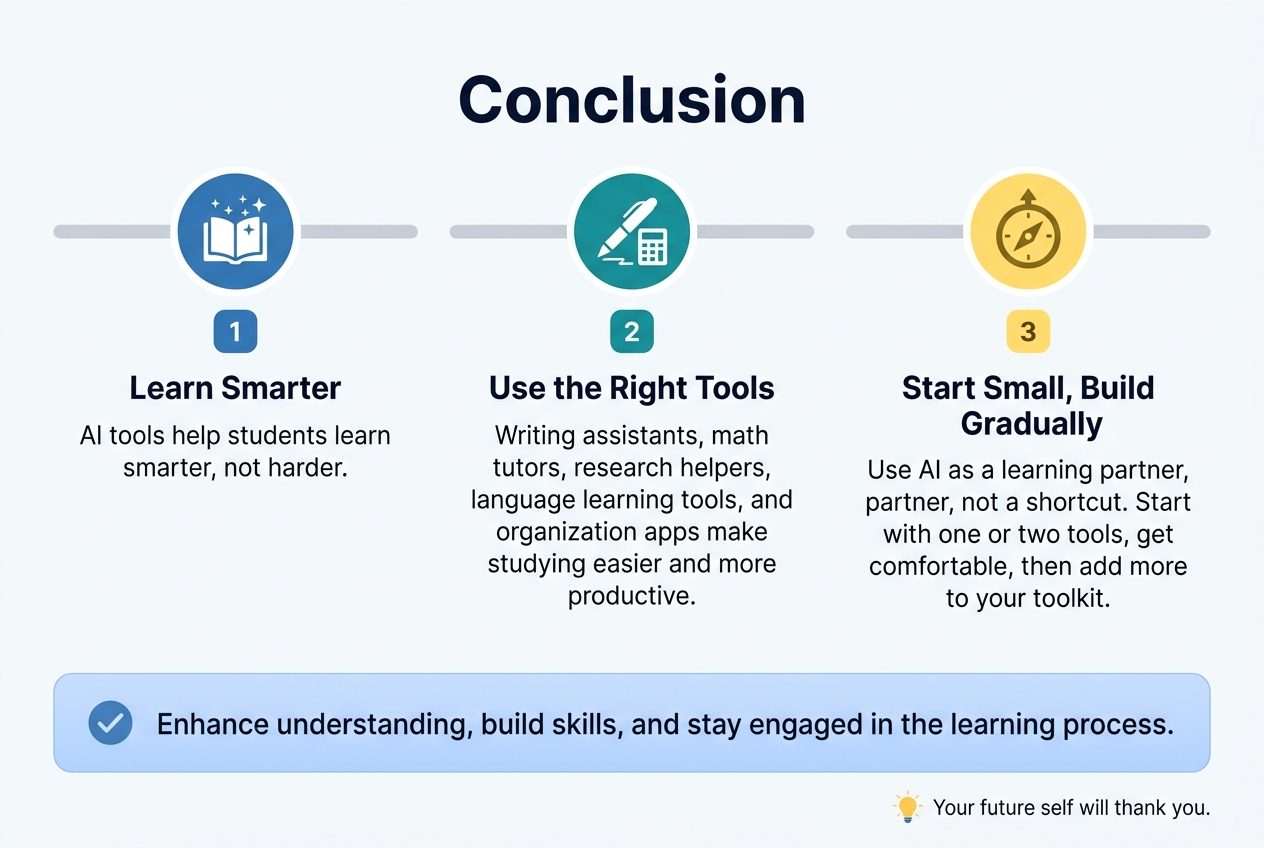
There are so many chances for students to benefit from AI tools that they could hardly be missed. From essay writing helpers to advanced math tutors, such services would allow you to significantly improve your performance, simplify research, language learning, and organization. It seems that AI tools have almost everything you may need during studying. In addition, all the tools mentioned above are totally free and even suitable for beginners.
However, it is essential to understand that AI services can become effective if treated correctly. You should try various AI tools to pick the most suitable one for yourself and then start using several at once. At the same time, it is highly recommended to start using AI only with one tool to avoid confusion. Using AI tools wisely and responsibly, you may boost your academic results significantly.
It was infirmative
Nice